Your video folder, ON THE AIR.
Remote Viewer turns the movies and shows on your Mac into TV channels that are always on. Pick up the remote, flip through, and land on something good. No scrolling, no choosing, no cloud.
The demo plays public-domain classics in your browser · Mac, Apple TV and iPhone apps in beta
You have 600 movies. You keep watching the same six.
A folder of videos is a library, and libraries make you choose. TV never asked. It was just on, and half the fun was what you stumbled into. Remote Viewer brings that back, with your own stuff.
HOW IT WORKS
On the air in about five minutes.
- Remote Viewer
Video folder
Movies & TV · 412 videos
✓ 398 ready for Apple TV
14 need a quick fixFix all
1Point it at your folder
Install the Mac app and pick the folder or drive with your videos. It reads what's there, works out titles and episodes, and checks what will play on your TV.
- 01 MIX412 VIDEOS02 CARTOONS86 EPISODES03 MOVIES143 MOVIES04 NOIR NIGHTS24 MOVIES2
Get channels
Starter channels appear on their own: one for each show you have a lot of, one for movies, a Mix. Or ask Claude: it spots themes across your library, like one director's films, 90s comedies, or a Saturday-morning cartoon block.
- 06 NOIR
Night of the Living Dead
1968 · Horror · George A. Romero
42 min left3Turn on your TV
Open Remote Viewer on your Apple TV or iPhone. It finds your Mac by itself and tunes in. Swipe to change channels; tap to see what's on.
FEATURES
Everything you loved about TV. Only your shows.
Always on
Every channel runs on a schedule, so when you tune in, something's already playing, just like real TV.
A guide channel
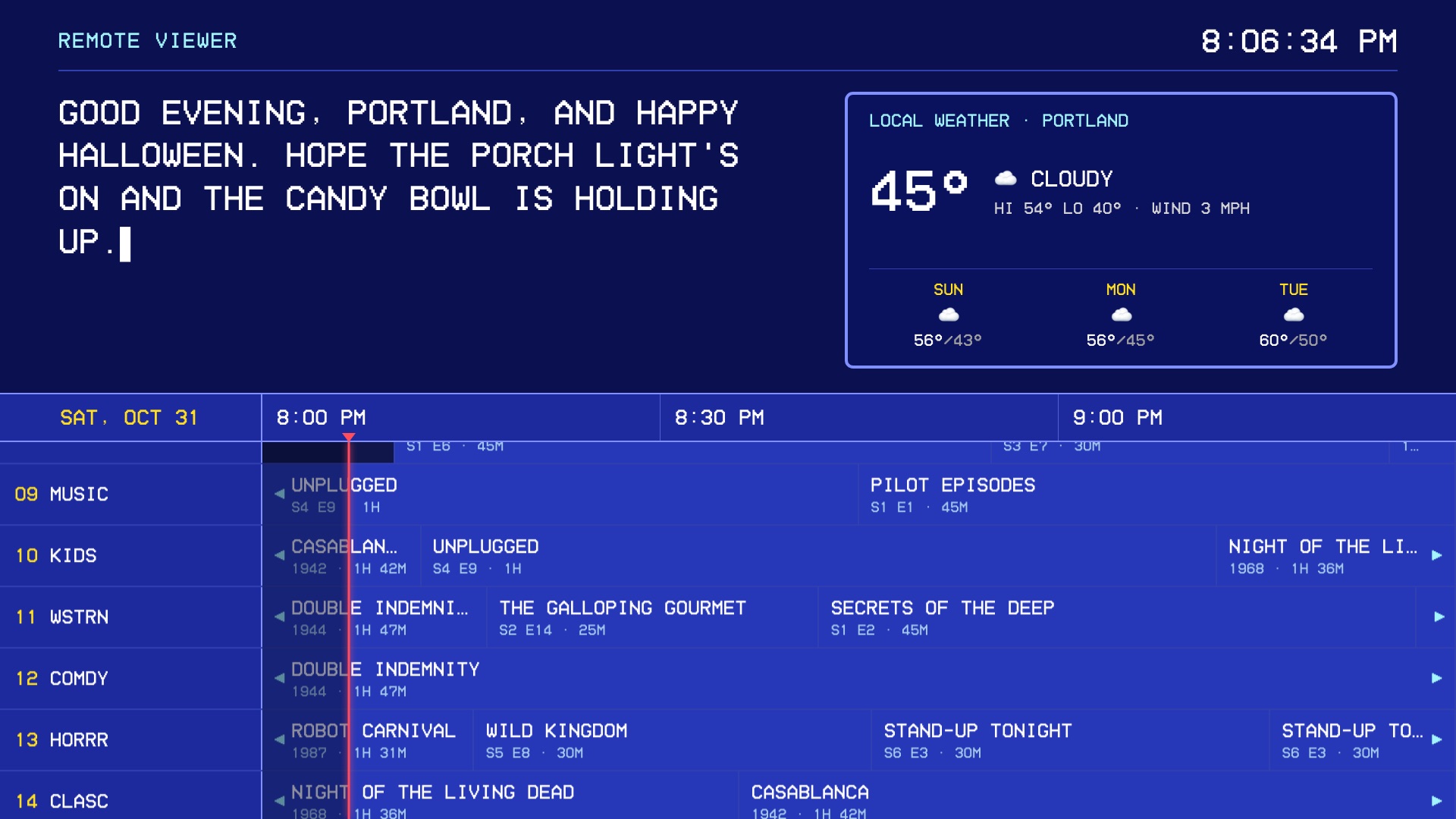
Channel 00 is a scrolling TV guide of everything on, with local weather and a host who says hello.
Your videos stay home
No account, no cloud, no upload. Your Mac plays straight to your TV and phone over your home network.
New videos find their channel
Drop a file in the folder and it's on the right channel a few minutes later. Delete one and it's gone.
Fixes files that won't play
MKV, AVI, or sound your TV can't handle? One click converts it. Your originals are kept until you say so.
Claude, built in
Titles, years, genres, and plots filled in for you, channel ideas from your genres, directors, and eras, and a guide host. Nothing to set up.
PRIVATE BY DESIGN
It all stays home.
Remote Viewer runs on your Mac and plays to your TV over your own network. There's no account to make, and your videos never pass through a server of ours. Your channels live in the same folder as your videos, so they go wherever the drive goes.
Only two things go online: the weather, and titles and details for the built-in Claude. Never your videos.
Your videos
A folder or drive
Your Mac
Remote Viewer, in the menu bar
Your Apple TV and iPhone
Every TV in the house, and the phone in your pocket
WHAT YOU NEED
Probably what's already in your living room.
- A Mac
- Apple silicon, macOS 13 Ventura or later. It runs quietly in the menu bar.
- An Apple TV or iPhone
- Apple TV HD or 4K with tvOS 17 or later, or an iPhone with iOS 16 or later, on the same network as the Mac.
- Your videos
- MP4, MOV, and M4V play as they are. MKV and AVI convert in a click.
- A home network
- Everything on the same Wi-Fi or wired network. Watching doesn't need the internet.
FAQ
Questions, answered.
Does Remote Viewer upload my videos anywhere?
No. Your videos stay on your Mac or drive and play straight to your Apple TV over your home network. There's no Remote Viewer account or cloud.
Do I need Plex or another media server?
No. Remote Viewer is the whole thing: point it at a folder and it makes the channels and serves them to your TV.
Where do the videos come from?
From you. Remote Viewer plays videos you already have, like movies you own, home videos, and digitized tapes. It doesn't find or download anything.
Can I pick what's on?
Yes, as much or as little as you like. Starter channels need no setup. You can build channels from a show, a folder, a genre, a director, a range of years, or titles you pick, and choose the order: shuffled, by episode, by year, or newest first. Or ask Claude for a whole lineup, or which channel a video belongs on.
Can I watch on more than one TV?
Yes. Every Apple TV on your network can tune in, each to whatever channel it likes.
Can I watch on my iPhone or iPad?
Yes. The iPhone app plays the same channels, guide included: swipe to flip, tap for what's on, AirPlay to any TV, or keep watching in picture in picture. It runs on iPad too.
I have videos on more than one Mac. Does that work?
Yes. Every Mac running Remote Viewer shows up on your Apple TV and iPhone by name; switch between them from the menu.
What does the AI do?
Remote Viewer comes with Claude built in, with nothing to sign up for or set up. It fills in titles, years, genres, and plots, suggests channels from your genres, directors, and eras, picks a channel for any video that isn't on one, and writes what the guide's host says. It sees titles, file names, and those details, never your videos.
How much does it cost?
Remote Viewer is free while it's in beta.
What's in the demo?
Public-domain classics from the Internet Archive, played the way Remote Viewer plays your own library: always on, with a guide. It runs in your browser; no download needed.
TONIGHT ON CHANNEL 01
Put your own channel on.
Remote Viewer is in beta and free. The apps are on their way to the App Store; until then, try the demo or ask to join the beta.
Mac
The server, in your menu bar
COMING SOON
Apple TV
Channels on the big screen
COMING SOON
iPhone and iPad
Your channels anywhere at home
COMING SOON